TMS + WMS
An LTL TMS and a warehouse system, in one login
Most TMS platforms stop at the dock door, and most WMS platforms start there. LanePilot covers both: quote and book outbound LTL freight on your own connected carrier accounts, and receive, store and count inbound freight at your own dock, with billing recovery running on each side. Built for small to mid-sized shippers who run their own receiving dock and do not have a separate integration budget to connect two systems that were never built to talk to each other.
By Aaron Brown, Founder & CEO · Reviewed by Aaron Brown · Published · Updated
Before, during, after
The same platform, both directions: freight going out and freight coming in.
Before
One system holds both directions
Your connected carrier accounts are set up for outbound quoting and booking. Your vendors and their preferred carriers are set up for inbound, in the Receiving Guide, so a shipment on the wrong carrier gets flagged before it is checked in.
During
Freight moves, and the dock runs
Outbound: quote across your carriers, book, and the Bill of Lading is generated for you, auto-filled from the quote on Shipper and above. Inbound: the same building's dock queue receives against the purchase order, checks quantities line by line, and captures anything over, short or damaged with a reason.
After
Recovery, and stock, land in the same place
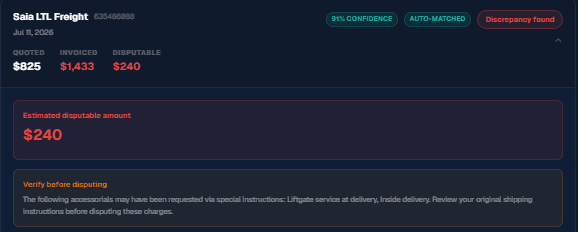
Outbound invoices are checked automatically against the quote they were booked at, and a dispute letter is drafted when something does not match. Inbound discrepancies draft a vendor chargeback letter. Good stock gets a digital bin location and shows up in inventory, ready for a cycle count.
One dock, one morning
A shipper books an outbound LTL shipment to a customer, quoting across their connected carriers and generating the Bill of Lading from the accepted quote. That same morning, an inbound purchase order arrives at their own dock: the receiver checks it in, marks one damaged carton with a reason, and puts the rest away in a digital bin location on the warehouse map. Three weeks later the outbound carrier invoice comes in and is checked automatically against the quote it was booked at; a billing error there drafts a dispute letter. The damaged carton from the inbound PO already drafted its own vendor chargeback letter the day it was found. Two different kinds of recovery, one system, instead of a TMS for the outbound lane and a separate tool for the dock that does not talk to it.
What is built, what needs Warehouse, what is not built
The bridge story only holds up if every claim on it is checked. Here is the line, stated plainly rather than implied.
Built today
- Outbound: plain-English rate quoting across your connected carrier accounts, one-click booking, auto-generated Bill of Lading, and shipment tracking
- Outbound invoice audit against the original quote on every freight plan, including Free, with a dispute letter drafted from the finding
- Inbound: receiving against the purchase order, dock queue, and OS&D capture with a reason, included in Warehouse Essentials ($79/mo) or the 37-day free trial
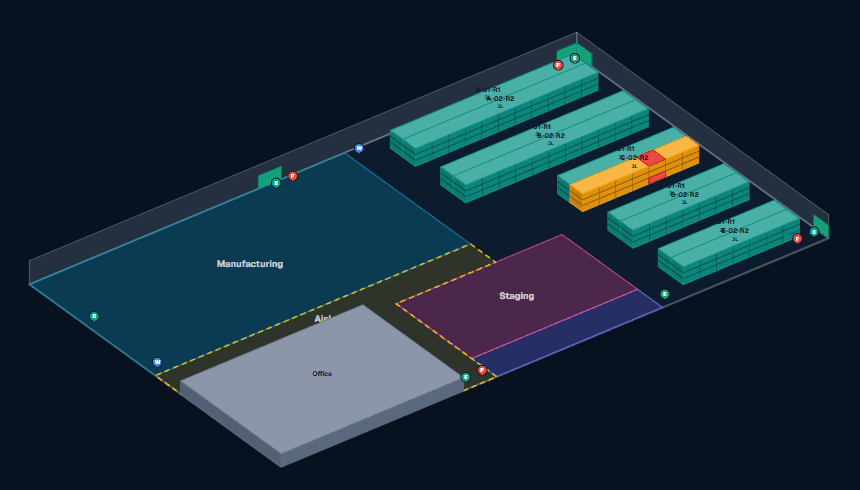
- Bin locations included in Warehouse Essentials; the 3D warehouse map you can spin, tilt and zoom is part of LanePilot Warehouse ($119)
- Inventory tied to receiving and purchase orders, with cycle counts, reason-coded adjustments, and an approval step above a threshold, included in Warehouse Essentials
- Serial numbers captured at receiving are checked against existing records before posting, and every write is confirmed by reading it back, not just assumed to have saved
- Serial and lot traceability for firearms and food SKUs, enforced at receiving
- Looking up or tracing inventory by lot code or serial number, holding a lot, and exporting serial records, all included in Warehouse Essentials
Needs Warehouse
- Vendor chargeback letters drafted from a receiving discrepancy, and the visual warehouse map. LanePilot Warehouse is $119 a month, its own line item, bought in addition to any freight plan and never instead of one
- PO-to-invoice reconciliation, comparing the invoice total against the value received within 5 percent (a total check, not a line-by-line match)
- Dock seats, $25 a month each, only govern how many dock-only workers can log in on their own account; any existing role can receive freight without one
- LanePilot Warehouse carries no freight allowances of its own, quote credits and invoice audits still draw from whichever freight plan it is added to
- Pick and pack: picks raised from an outbound order can be grouped into a wave for one walk of the building with wave picking (a single pick cannot become a wave); sign-off finalizes the pick evidence without moving stock, pack is handled from the shipment's own printable packing slip, and inventory is deducted automatically once it ships
Not built, do not assume it
- LanePilot does not audit inbound freight invoices automatically. Cost on inbound freight is entered manually, and inbound recovery runs through OS&D capture and vendor chargebacks, not an automated invoice comparison
- Pickup tendering is not automatic across all carriers: it is live today for carriers with a tender adapter, like ArcBest, XPO, FedEx Freight, Estes, and Old Dominion, on Professional tier and above. For any other carrier, or on Free and Shipper, use the generated Bill of Lading to schedule pickup with the carrier yourself
- LanePilot does not calculate inventory valuation or cost of goods today
What LanePilot does not claim to replace
The seam between freight and warehouse is the whole point, but it has edges, and these are them.
A multi-mode TMS
LanePilot covers LTL. If truckload, intermodal, parcel, ocean or air is a meaningful share of your freight, those modes are not covered here.
An ERP
LanePilot is not a general ledger or a financial system of record. It does not calculate inventory valuation or cost of goods today.
Go deeper on either side
OS&D receiving covers catching over, short and damaged inbound shipments and drafting the vendor chargeback letter.
How LanePilot works walks through outbound quoting, booking, invoice audit and dispute letters in detail.
LanePilot vs a traditional TMS compares the booking-only category to a system that also audits and receives.
Pricing has the plan breakdown and the LanePilot Warehouse line item on its own row.
Common questions
Is LanePilot a TMS or a WMS?
Both, in the sense that matters for a small shipper: one login for quoting and booking outbound LTL freight, and for receiving, storing and counting the freight that comes in the other direction, including wave picking and pick sign-off on LanePilot Warehouse. It is not a full enterprise WMS (no inventory valuation) and not a multi-mode TMS (LTL only).
Do I need to buy both the TMS and the warehouse features?
No, and they are billed separately. The freight side, quoting, booking, tracking and invoice audit, is on every freight plan, including the free plan (5 quote credits and 7 invoice audits a month, on two separate meters). LanePilot Warehouse is a separate, standalone product with no permanent free tier: a 37-day free trial (no card) runs the full product, then receiving basics, the dock queue, check-in with OS&D capture, bin location records, inventory and cycle counts are included in Warehouse Essentials at $79 a month, while LanePilot Warehouse at $119 a month adds the visual warehouse map, vendor chargeback letters, PO-to-invoice reconciliation and the rest. Warehouse is bought in addition to any freight plan and is never required to use the freight side.
Is the warehouse map a real 3D view?
Yes. LanePilot's warehouse map has a 3D view: it spins, tilts and zooms, with your zones, racks and bins drawn in and rack height rendered as shelf levels.
Does LanePilot audit invoices on freight I receive, the way it does on freight I ship?
Not yet, and this page will not claim otherwise. The automatic invoice audit engine runs on outbound freight today. On inbound freight, recovery runs through OS&D discrepancy capture at receiving and the vendor chargeback letter that gets drafted from it.
More on freight ops: when quote, PO, receipt and invoice don't match and FedEx Freight LTL rates after the spinoff.
Deciding between the two: TMS vs WMS vs both, what a small shipper actually needs.
See the audit side working first
Send a real outbound freight invoice and the original quote for that shipment, and LanePilot shows you what it finds. Free, no account needed. The receiving and warehouse side opens up with a free account.
Run a free invoice auditPrefer to look around first? See how it works or compare the plans.