How it works

Built for people who ship freight, not software engineers.

Every feature designed by someone who spent nearly a decade in LTL operations. No jargon. No complexity. Just smarter freight decisions.

Try a free invoice audit, no account needed →
Plain-English rate queries
Just describe the shipment. LanePilot parses your words and returns live rates from your connected carriers in under 60 seconds.
All tiers
Live carrier comparison
Your connected carriers, ranked by price and your lane-specific scorecard data. Not a national average, your actual performance history on that corridor.
All tiers
One-click booking + auto-generated BOL
Book the carrier you choose directly on your own connected carrier account. LanePilot generates the Bill of Lading from your quote automatically. Live pickup tendering sends the request straight to the carrier for supported carriers like ArcBest, XPO, FedEx Freight, Estes, and Old Dominion, on Professional tier and above; for any other carrier, you use the generated BOL to schedule pickup with the carrier yourself. No re-entering information, no separate carrier portal.
All tiers
Carrier scorecard intelligence
7 metrics rated per carrier per lane: on-time delivery, invoice accuracy, claims rate, pickup reliability, communication, accessorial accuracy, transit time. Shipment data and the ratings you add sharpen each score.
Shipper and above
Invoice audit + dispute letters
Every invoice automatically checked against your original quote. Dispute letter generation is included on every plan, with a monthly allowance that starts on Free and is unlimited on Professional+ and above: one click gets you the carrier-specific letter, showing the quoted-versus-billed arithmetic and asking the carrier for the basis of the charge.
All tiers
Rate alerts: threshold triggered
Set a price threshold on any lane. LanePilot re-checks several times every business day and emails you when a carrier hits your target. Open a quote directly from the alert.
Professional
KPI dashboard: 23 metrics, 5 buckets
Performance, cost, carrier, efficiency, and compliance metrics in one view. Favorites tab with sparklines. Professional gets full drill-down and 12-month trend lines; Professional+ adds industry benchmark comparisons.
All tiers
Inbound receiving + warehouse management
Run the dock, not just the lane. Receive inbound shipments against your purchase orders, and give every rack and shelf a digital bin location. Manage the dock queue and put stock away where it belongs. Mapping your warehouse and spinning the layout in an interactive 3D view are part of the LanePilot Warehouse tier.
Warehouse Essentials and above
Inventory management
Track SKUs and stock levels tied to your receiving and purchase orders, run cycle counts, and reconcile adjustments with an approval step. Your freight, your warehouse, and your inventory in one system instead of three.
Warehouse Essentials and above

From a LanePilot demo account

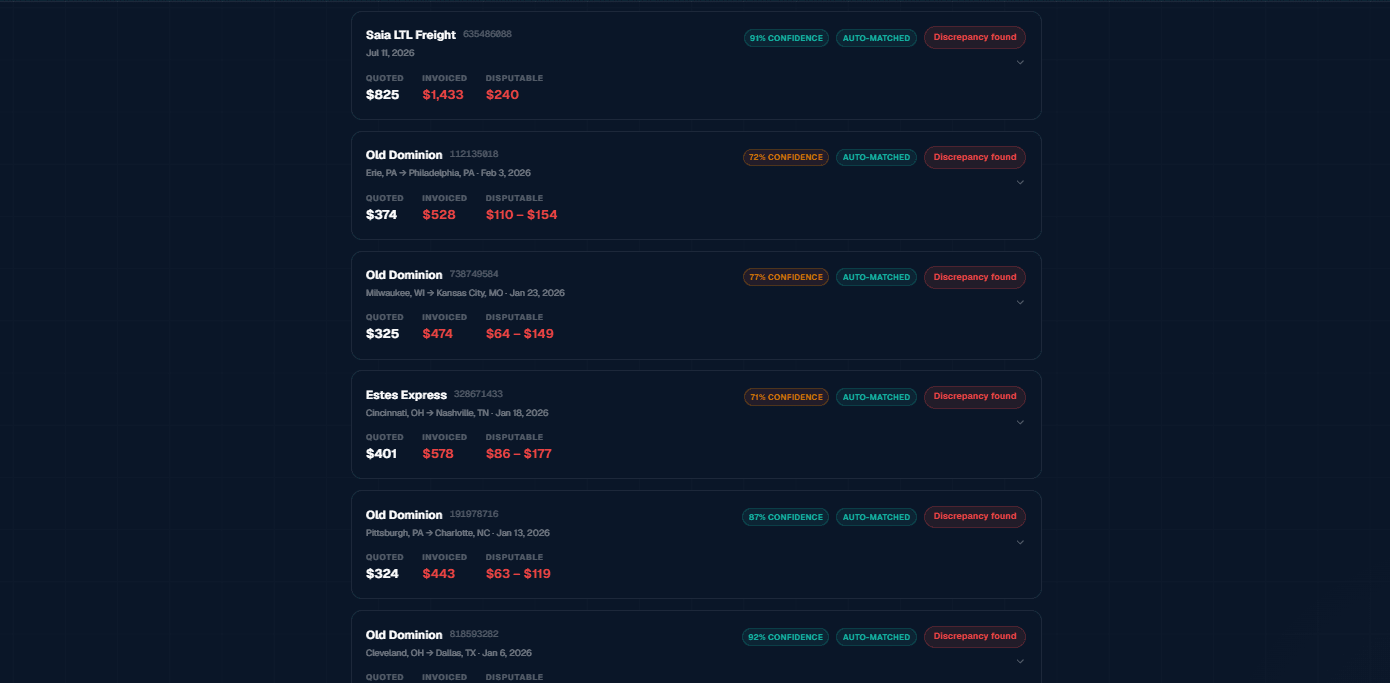
Demo data shown. LanePilot's Invoice Audit flagged list shows a Saia LTL Freight shipment at 91% confidence and auto-matched: quoted $825, invoiced $1,433, disputable $240, above five more auto-matched quote-to-invoice comparisons.
Demo data shown. LanePilot compares the original quote with the carrier invoice, then separates potentially disputable charges from items that need verification.
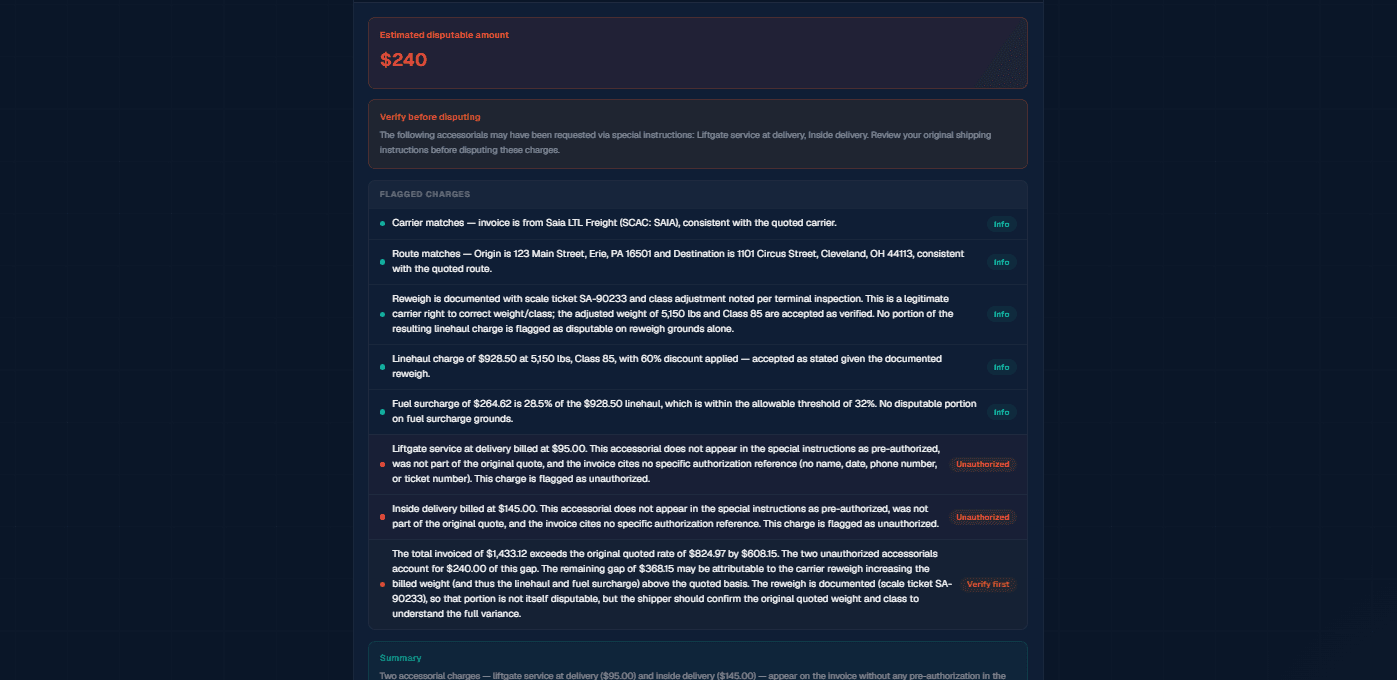
Demo data shown. LanePilot's audit finding detail accepts the carrier and route matches, accepts a reweigh documented by scale ticket SA-90233, and accepts the linehaul and fuel surcharge. It flags liftgate service at $95.00 and inside delivery at $145.00 as unauthorized, then marks the remaining $368.15 gap verify first.
Demo data shown. LanePilot explains what matched, what appears unauthorized, and what the shipper should verify before filing a dispute.
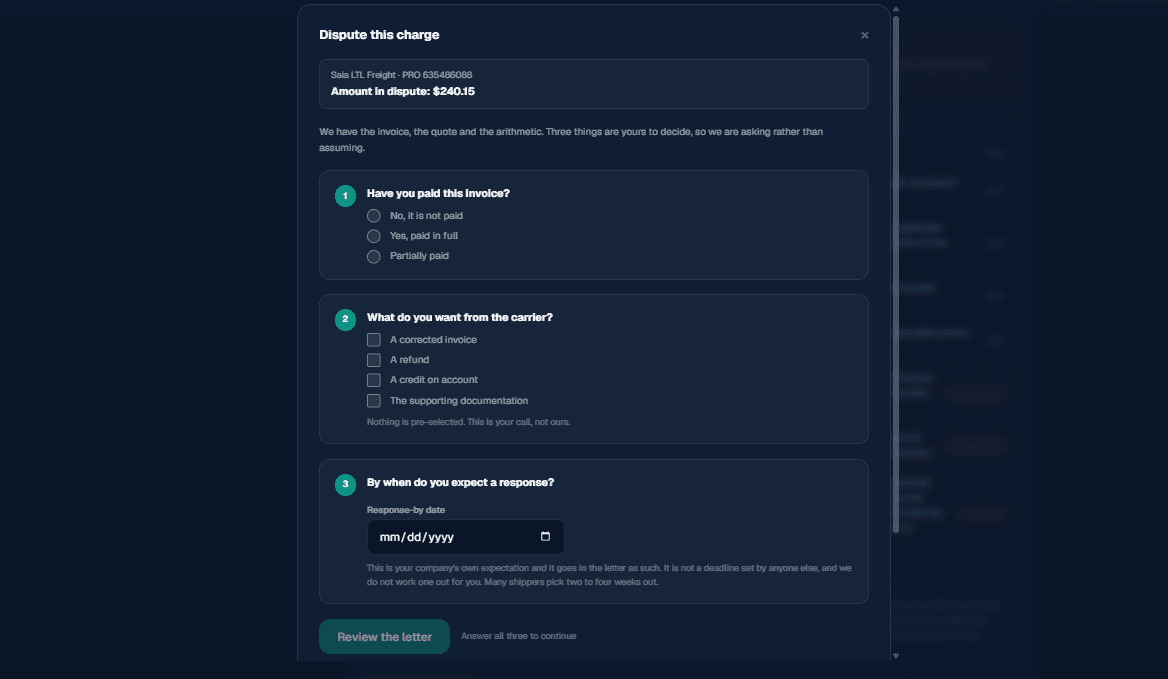
Demo data shown. LanePilot's dispute setup screen for a Saia LTL Freight charge, showing three unanswered questions (payment status, requested remedy, and expected response date) with nothing pre-selected, and a disabled Review the letter button until all three are answered.
Demo data shown. LanePilot prepares the evidence and arithmetic, while the shipper chooses what to request and files directly with the carrier.

From question to booked shipment in 3 steps

No freight expertise required.

1
Describe your shipment
Type it in plain English. Origin, destination, weight, commodity. LanePilot handles the rest.
2
Compare live rates
Your connected carriers compared instantly, ranked by price and your scorecard data. Color-coded for clarity.
3
Book in one click
Select a carrier and book on your own account. BOL generated automatically. Live pickup tendering sends the request straight to the carrier for supported carriers like ArcBest, XPO, FedEx Freight, Estes, and Old Dominion, on Professional tier and above; for any other carrier, use the BOL to schedule pickup yourself.
STANDALONE PRODUCT

And when the freight arrives, in 3 more steps

The same platform runs your dock, warehouse, and inventory.
1
Receive against the PO
Match the inbound shipment to its purchase order. LanePilot checks quantities and flags discrepancies as the freight comes off the truck.
2
Put it away by bin
Assign stock to a digital bin location on your warehouse map. Find any item later with a search, or spin the layout in the 3D view.
3
Keep inventory honest
Cycle-count on a schedule, reconcile adjustments with an approval step, and keep stock levels tied to your receiving and purchase orders.
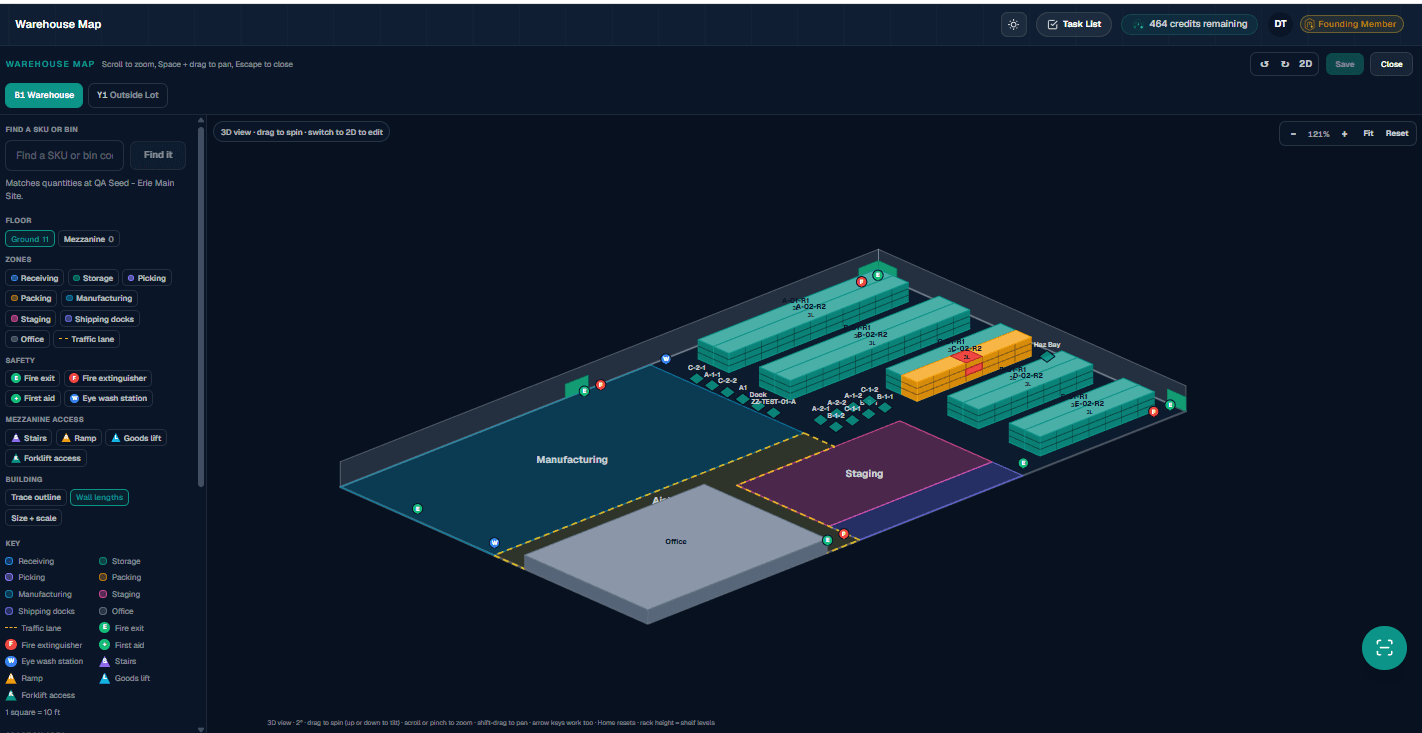
Demo data shown. LanePilot's Warehouse Map in 3D view: an isometric warehouse floor with teal rack rows, one rack highlighted orange and red as a search match, zones labeled Manufacturing, Staging and Office, and readable bin codes on the racks. A left panel carries a find a SKU or bin search, floor and zone filters, safety and mezzanine markers and a key, with a tab for a second location, Y1 Outside Lot.
Demo data shown. LanePilot gives warehouse teams an interactive 3D view of zones, racks, staging areas, and interactive digital bin locations. Every rack position is a real bin address, so the find-it search takes you straight to the shelf holding any SKU.
Questions about the process

How the workflow actually runs

Do I have to remember to send in every invoice myself?

No. Every organization gets its own intake email address. Forward or send the carrier invoice and the original quote there and the audit runs automatically, no request needed. You can also upload both documents manually from the dashboard whenever that is easier.

Why does LanePilot need the original quote, not just the invoice?

An invoice by itself only shows what you were billed, not what you agreed to pay. LanePilot audits by comparing the invoice against the original quote line by line, so both documents are required, an invoice without its matching quote cannot be audited. Uploading your carrier contract is a separate, optional step for contract benchmarking, not a requirement for an audit.

If LanePilot finds a billing error, does it deal with the carrier for me?

No. LanePilot generates a dispute letter that lays out what you were quoted, what you were billed, and the difference, and you send it to the carrier yourself. LanePilot never negotiates with a carrier, never files a dispute on your behalf, and never selects a carrier for you. It produces the paperwork, you stay in control of the conversation.

What happens on the receiving side when freight arrives at my dock?

That side of the platform runs as its own process. You receive the inbound shipment against its purchase order, and LanePilot checks quantities and flags discrepancies as the freight comes off the truck. From there you put the stock away to a digital bin location on your warehouse map and keep inventory honest with scheduled cycle counts. Recovery runs on this side too: short, damaged or non-compliant shipments feed into a vendor chargeback or OS&D claim, the same way a billing error on an outbound invoice feeds into a dispute letter.

Can I see how the audit works before I create an account?

Yes. Create a free account any time, no credit card required, or try the audit first with no account: send one carrier invoice and its original quote through the free audit at /try and read the findings on screen.

Once I send a dispute letter, does LanePilot track whether the carrier actually pays it back?

Yes, on every plan including the free one. Each dispute you send is logged against its expected recovery amount, and you record the outcome as the carrier responds, so recovered dollars show up on your KPI dashboard instead of getting lost in an inbox. What changes by plan is how many dispute letters you can generate each month: 2 on the free plan, 7 on Shipper, 15 on Professional, and unlimited on Professional+ and Command. Recovery, not just detection, is the point of the audit.

Ready to see what LanePilot finds?

Upload one carrier invoice and the original quote for that shipment, and read the findings on screen. No account, no credit card.

Already running a TMS? See how LanePilot compares.