Bin locations
Warehouse bin locations for small shippers
A bin location is only useful if it beats memory. LanePilot lets you keep a simple list of your bins, each with a code and an optional zone, assigns a real bin when stock is put away, and lets anyone find a SKU by search instead of by walking the aisles or asking the one person who remembers. Built for small to mid-sized shippers whose whole warehouse used to live on a whiteboard, or in one person's head.
By Aaron Brown, Founder & CEO · Reviewed by Aaron Brown · Published · Updated
Before, during, after
The same structure every time, so a bin location means the same thing to everyone who reads it. See how a bin location gets assigned during receiving for the full flow.
Before
Your bin list gets set up once
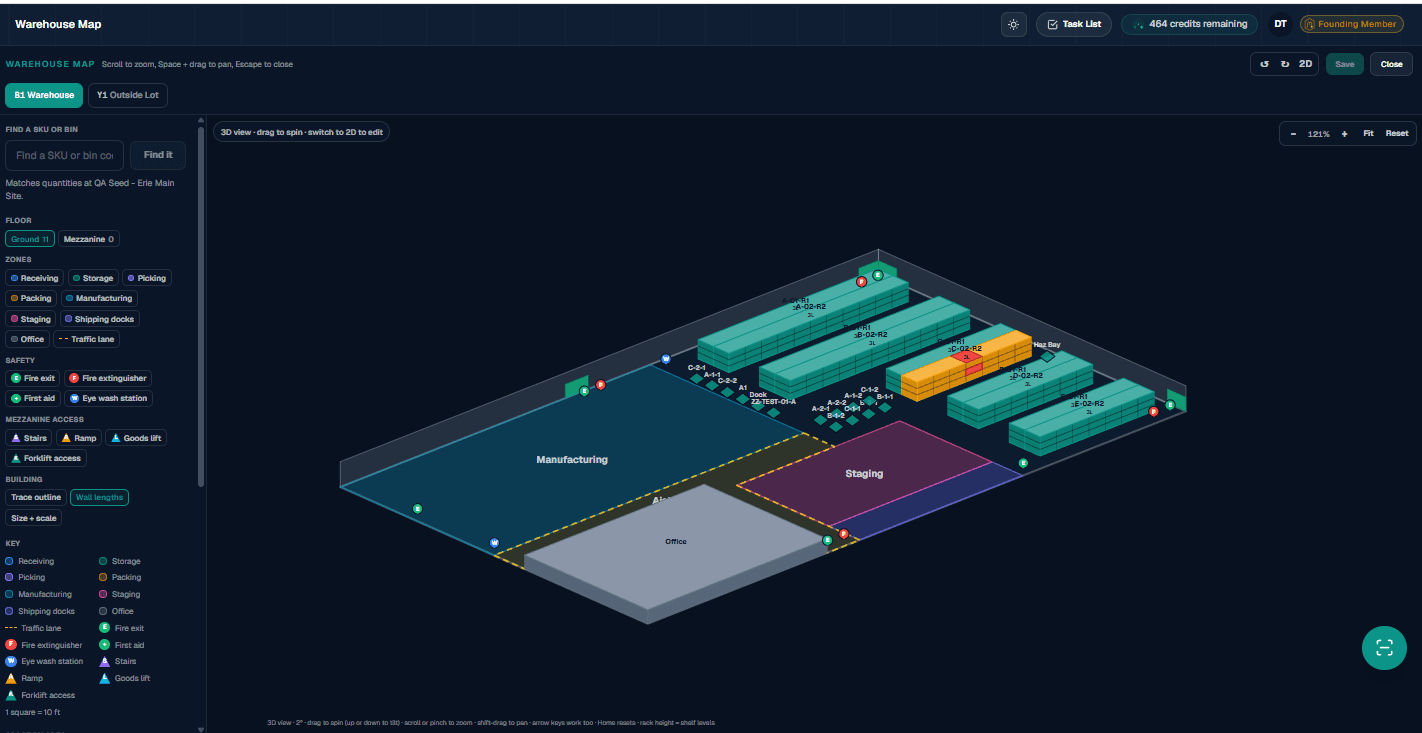
Each bin gets a code or name and, if you want one, a zone, under your storage area. On Warehouse Essentials you add up to 250 active bins from a simple list, so a location name means something instead of being whatever was written on a piece of tape last year. LanePilot Warehouse adds the Warehouse Map, where the racks you draw create your bins and name them from their zone, aisle, rack and shelf level.
During
Stock goes away on purpose
When good stock clears receiving, it gets put away to a specific bin rather than the nearest open spot. A search finds a SKU's bin, or a bin's contents, from a phone or a tablet on the floor, without walking the aisles to check.
After
The record and the shelf agree
Every move, from receiving putaway to a transfer between bins, posts to the movement history with the from and to location. What the system says is in a bin is what is actually in that bin, because nothing moves without leaving a record of where it went.
Finding one SKU without walking the floor
A packaging SKU arrives on an LTL pallet, comes in on a receiving PO, and gets put away to bin A12 in your Receiving zone, a location you added to your bin list ahead of time. Three weeks later, someone on the phone needs to know if there is enough on hand to fill an order. A search by SKU returns the bin location directly, no walking the aisles and no calling someone who might remember. When the SKU later gets moved to consolidate two partial bins into one, that move posts to the history with the from and to location, so the record never drifts from what is actually on the shelf.
What is built, what needs Warehouse, what is not built
A capability list is only useful if it says where the line actually is. Here is the line.
Built today
- Included with Warehouse Essentials ($79/mo) or the 37-day free trial. None of it needs LanePilot Warehouse ($119)
- A simple bin list: add bins by code or name with an optional zone, up to 250 active bins on Warehouse Essentials
- Putaway assignment when stock clears receiving: a specific bin, not just a status of received
- Bin search: find a SKU's location, or a bin's contents, without walking the floor
- Every move (putaway, transfer, consolidation) posts to the movement history with the from and to bin
- Bin records tied to inventory, so the location shown for a SKU is always the one it actually moved to last
- Serial and lot traceability for firearms and food SKUs, enforced at receiving
Needs Warehouse
- The visual warehouse map, a 3D view of your whole layout you can spin, tilt and zoom to see zones, racks and bins at once. LanePilot Warehouse is $119 a month, its own line item, additive to any freight plan and never a replacement for one
- The vendor chargeback letter drafted from a receiving discrepancy also sits behind Warehouse
- Outbound fulfillment end to end: pick and pack, wave picking, and printable packing slips, pulling stock from the bin it actually sits in, with inventory deducted automatically
- Dock seats, $25 a month each, only govern how many dock-only workers can log in on their own account; any existing role can put away and search bins without one
Not built, do not assume it
- No automated slotting recommendation; you choose the bin, LanePilot records where it went
- A bin location holds quantity by SKU. Serial and lot detail is tracked on the SKU, not per bin
See the rest of the platform
Inventory management covers the quantity side: cycle counts, reorder points and reason-coded movements.
Warehouse receiving covers how stock gets checked in against a purchase order before it is ever put away.
OS&D receiving covers what happens when a receiving discrepancy needs a vendor chargeback letter.
Pricing has the full breakdown of LanePilot Warehouse and the visual map at each level.
Common questions
What is a bin location in a warehouse?
A specific, named place stock lives, with a code or name and, if you use one, a zone, rather than a general area someone remembers as "over by the door". A good bin location is precise enough that anyone, not just the person who put the stock there, can find it.
How should I name my warehouse bins?
A consistent code beats a clever one. Give each bin a short code, such as A12, and use a zone to group the bins that sit together, such as Receiving or Cold. LanePilot puts your storage area code in front of each bin, so every bin name stays unique. On LanePilot Warehouse, bins drawn on the Warehouse Map are named for you from their zone, aisle, rack, level and position.
Do I need LanePilot Warehouse to set up bin locations?
You need a warehouse subscription, but not LanePilot Warehouse ($119) for the records themselves. Every warehouse account starts with a 37-day free trial, no card required. After that, adding bins to your bin list (up to 250 active bins), assigning a bin on putaway, and searching for a SKU's location are included in Warehouse Essentials at $79 a month. LanePilot Warehouse, at $119 a month, adds the Warehouse Map, a 3D view of the whole layout where the racks you draw create your bins, with no bin limit. Both sit additive to any freight plan.
Can I see my whole warehouse layout, not just a list of bins?
Yes, with LanePilot Warehouse active. The warehouse map is a 3D view of your zones, racks and bins that you can spin, tilt and zoom, with rack height rendered as shelf levels, rather than a flat list you have to read line by line.
See LanePilot catch a billing error
Send a real outbound freight invoice and the original quote for that shipment, and LanePilot shows you what it finds. Free, no account needed. Bin locations and the rest of Warehouse open up with a free account.
Run a free invoice auditWant the receiving workflow first? See how it works or see LanePilot Warehouse pricing.